What's New
Bug fix...
Bug fix...
Size:
Category:
Navigation
Navigation
OS:
iOS
iOS
Price:
$1.99
$1.99
Compatible:
iPhone iPad
iPhone iPad
Requirements:
Compatible with iPad.
Compatible with iPad.
Version:
3.5.0
3.5.0
Description - MapProjector with Google Maps
EpIPhone Coders` Guild , the publisher behind many iOS app (iPunchclock ,iMeetingPad ,MapProjector with Google Maps ,SnapMapper for Google maps ,iTimeCard ,iBisCard), brings MapProjector with Google Maps with a number of new features along with the usual bug fixes. MapProjector with Google Maps app has been update to version 3.5.0 with several major changes and improvements. App release that improves performance, provides several new options.
.
The MapProjector with Google Maps is now available for $1.99 for both iPhone and iPad owners.The application is designed for use in English language. It weighs in at only 10MB to download. The new MapProjector with Google Maps app version 3.5.0 has been updated on 2014-11-19. For ensuring consistency with the device you should take into account the following app compatibility information: Compatible with iPad. Requires iPhone OS 3.2 or later.
More Info: Find more info about MapProjector with Google Maps in EpIPhone Coders` Guild`s Official Website : http://www.chrysalisinitiative.com/ecg/MapProjector/
More Info: Find more info about MapProjector with Google Maps in EpIPhone Coders` Guild`s Official Website : http://www.chrysalisinitiative.com/ecg/MapProjector/
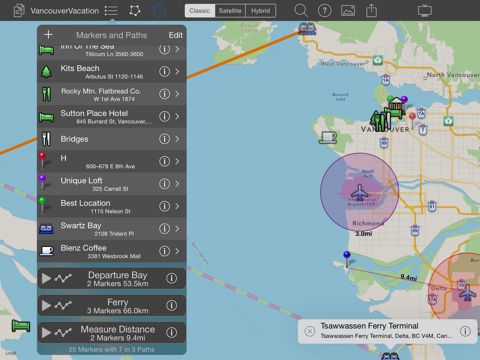
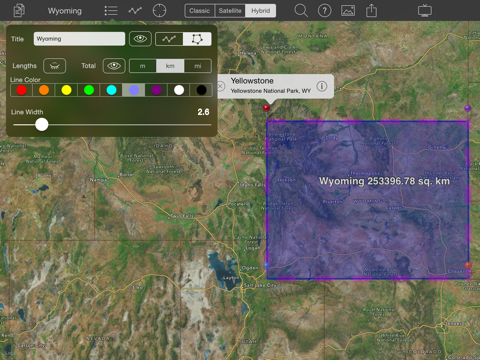
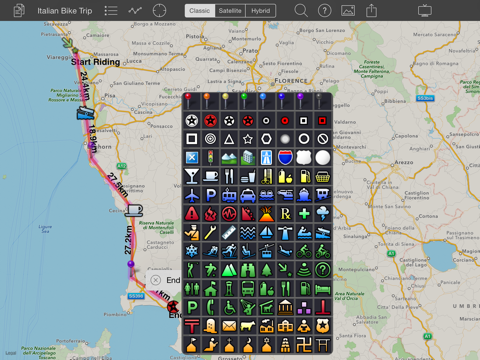
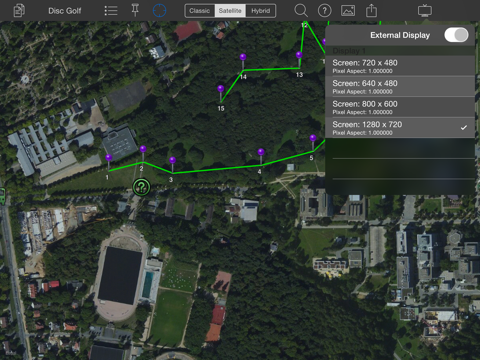
Present live maps and satellite imagery from your iPad to a TV or projector Map projector lets you save multiple maps with landmarks, and present them on the big screen. Live updates let you zoom and ...
Your app I the best so far Better what I have seen Like to see a note box I can drop my ideas in then it will be 4 stars Notes Rooog
I use this application every single day and my business partners and I have relied on it for the past year LATLEY WE HAVE ENCOUNTERED PROBLEMS WITH THE APP CRASHING UPON START UP We open the app but it fails to launch it just sends the user back to the desktop Removing our existing map files deleting the app reinstalling the app and then reinstalling our maps seems to cure it in the short term until it fails again a couple days later There is no topic in the discussion forum no help line to call and no email address to send to for help Seems like if you pay for an app there should be SOME kind of support in place Also with the latest update my pin marks have become semi transparent and I can no longer establish the color on the first drop I now have to open the pallet and choose a different color This is much more inconvenient If they are going to make this a feature that is fine but please make it adjustable in the settings When in working order I find this application to be invaluable for establishing locations with addresses and notes I just wish they d put it back the way it was and provide a support avenue Crashes Latest update not so good for me Bighaasfly
It s an ok map editor but I bought it to have access to Fusion Tables That may have worked at one time but it doesn t work anymore I reported it to the developers support page and never heard back Ok but development has stopped and there s no support LarryDotOrg
I bought this app to help me visualize my Google Fusion Tables When I attempted to use this feature I got the following error Login Required Error 401 I have logged into Google using the facility provided by this application So when I clicked on the Dev Site and Support Buttons I was directed to a BBS site that no longer exists Has anyone else run into this issue Is there a workaround Thanks Support Warlet
Great new version and good app to add enhancements to the built in mapping It would have gotten 5 stars if the app had the ability to automatically record a GPS trail of where you have been so you can save or share Seems like a good niche since there does not appear to be another app with this capability Nice app C404
Would have 5 stars with a built in search Nice byron426
I wonder why no one else did this I really like the idea to have a map on the tv For example you could show the route of your last road trip to your family and friends You don t have to do that on the computer or the ipad This is the way to go Thumbs up I love it Cool little app TLS_25
I bought this app to help me visualize my Google Fusion Tables When I attempted to use this feature I got the following error Login Required Error 401 I have logged into Google using the facility provided by this application So when I clicked on the Dev Site and Support Buttons I was directed to a BBS site that no longer exists Has anyone else run into this issue Is there a workaround Thanks Support
Would have 5 stars with a built in search Nice
I use this application every single day and my business partners and I have relied on it for the past year LATLEY WE HAVE ENCOUNTERED PROBLEMS WITH THE APP CRASHING UPON START UP We open the app but it fails to launch it just sends the user back to the desktop Removing our existing map files deleting the app reinstalling the app and then reinstalling our maps seems to cure it in the short term until it fails again a couple days later There is no topic in the discussion forum no help line to call and no email address to send to for help Seems like if you pay for an app there should be SOME kind of support in place Also with the latest update my pin marks have become semitransparent and I can no longer establish the color on the first drop I now have to open the pallet and choose a different color This is much more inconvenient If they are going to make this a feature that is fine but please make it adjustable in the settings When in working order I find this application to be invaluable for establishing locations with addresses and notes I just wish theyd put it back the way it was and provide a support avenue Crashes Latest update not so good for me
Its an ok map editor but I bought it to have access to Fusion Tables That may have worked at one time but it doesnt work anymore I reported it to the developers support page and never heard back Ok but development has stopped and theres no support
I wonder why no one else did this I really like the idea to have a map on the tv For example you could show the route of your last road trip to your family and friends You dont have to do that on the computer or the ipad This is the way to go Thumbs up I love it Cool little app
Great new version and good app to add enhancements to the built in mapping It would have gotten 5 stars if the app had the ability to automatically record a GPS trail of where you have been so you can save or share Seems like a good niche since there does not appear to be another app with this capability Nice app
By Kostas Gar.