What's New
Bug fix...
Bug fix...
Size:
5.1 MB
Category:
Business
Business
OS:
iOS
iOS
Price:
Free
Free
Compatible:
iPad
iPad
Requirements:
Compatible with iPad.
Compatible with iPad.
Version:
2.0.634.0
2.0.634.0
Description - GoToMyPC (Remote Desktop)
HIGHLIGHTS
- This is the best Remote Desktop program I have used..
- This is simply the best remote access app out there..
.
Overall Satisfaction58
This is simply the best remote access app out there.
complicated and it lacks features that other remote access apps have.
This is certainly better than logmeIn app.
Great job Citrix.
Awesome amazing.
I would recommend this app to anybody that needs it.
Fun & Engaging76
GoToMyPC on iPhone awesome in a pinch.
Awesome remote app.
Gets better all the time.
Usefulness87
I have access to everything on my desktop from an iPad.
Useful for mobile work.
It has become indispensable tool.
Ease of Use89
GoToMyPC is super easy to use and performance and reliability is excellent.
Easy setup.
Very handy and convenient.
Reliability12
Security & Privacy78
I just connected to my desktop.
For those of us who already have a GoToMyPC account.
Hoping to access my ups account and print a label.
secure and very convenient.
Updates & Support38
Working Mom /Legal Assistant. found in 2 reviews
Beats lugging a laptop everywhere. found in 2 reviews
This is certainly better than logmeIn app. found in 4 reviews
Great product updates keep making it better. found in 1 reviews
Great job Citrix. found in 2 reviews
it is small and hard to manipulate. found in 1 reviews
I ended up having to drag -&-drop the file. found in 1 reviews
took you guys long enough. found in 1 reviews
Very handy and convenient. found in 1 reviews
Great program and greAt App. found in 1 reviews
It has become indispensable tool. found in 1 reviews
Great app now even better with precision mouse control. found in 3 reviews
I didn't really expect this app to work very well. found in 1 reviews
Useful for mobile work. found in 1 reviews
I find GoToMyPC very user friendly. found in 4 reviews
I love having my work desktop at my fingertips whenever I need it. found in 1 reviews
Worked for first time now issues. found in 1 reviews
Please please add "right mouse click and drag ". found in 1 reviews
Needs to be fixed. found in 2 reviews
Great App but one Problem. found in 1 reviews
single and double click not working. found in 1 reviews
- one star for lack of bluetooth keyboard support. found in 5 reviews
One Small Issue. found in 1 reviews
open keyboard and then choose split keyboard. found in 4 reviews
Great app but problem with last update. found in 1 reviews
This app worked great until I upgraded to iOS 4. found in 1 reviews
Typing doesn't work. found in 1 reviews
Great app- needs sound. found in 2 reviews
No arrow keys. found in 3 reviews
Split keyboard broken. found in 1 reviews
but sometimes it's just a grey screen. found in 3 reviews
If you have to use an iPad to remotely connect to your computer. found in 2 reviews
Does not work on iPad with Bluetooth keyboard. found in 1 reviews
please review the Jump Desktop cursor interface and implement it. found in 3 reviews
virtually impossible to control the remote PC reliably. found in 4 reviews
Keyboard issue NEEDS to be fixed. found in 2 reviews
Every time I try to connect to my office computer. found in 17 reviews
the app does not cost anything to download. found in 6 reviews
Only thing I get is "we've encountered an internal error ". found in 2 reviews
I thought this would be a great way to work remotely. found in 2 reviews
no support for an external keyboard. found in 5 reviews
frustrating when trying to navigate through a large email inbox. found in 5 reviews
The GoToMyPC (Remote Desktop) is now available as a free download on Apple Store for iPad owners. The application is designed for use in English language. It weighs in at only 5.1 MB to download. The new GoToMyPC (Remote Desktop) app version 2.0.634.0 has been updated on 2014-11-18. For ensuring consistency with the device you should take into account the following app compatibility information: Compatible with iPad. Requires iOS 4.2 or later.
Bottom Line: For more information about GoToMyPC (Remote Desktop) check developer Citrix Online`s website : http://www.gotomypc.com
Bottom Line: For more information about GoToMyPC (Remote Desktop) check developer Citrix Online`s website : http://www.gotomypc.com
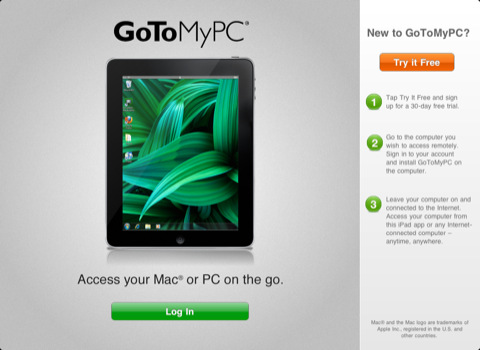
GoToMyPC is the fast, easy and secure way to instantly connect to your Mac or PC, with access to all of your files, programs and network. And now you can take it to go with ...
Love being able to access my computer from anywhere in the world Have been using Go to my PC for years It is extremely easy Great app
Been using gotomypc desktop for years Being able to use it mobile is awesome They did an excellent job creating this app You will not be disappointed Best app for this
It is so easy to access my work desktop from home Only issue is now that its so easy we are expected to do a little extra at home Great App
If you travel as much as I do its completely awesome to have all your work files and total access to you work PC via your iPhone This product is amazing worth every penny Total access
My truck is my office This app works so well I no longer carry a laptop just an iPad I can do most things on my iPad but when I need the big computer that is back at the office this app makes it happen even in rural areas Best yet it is easy enough to use that even a nontechie person like myself can use it no problem This works
I have used GotomyPC for 8 years It has operated flawlessly from my home computers in Florida in New Jersey and other places I have been able to access and transfer important files which has had an enormous advantage I wish all programs worked this well GotomyPC
I think GoToMyPC is a great product at a reasonable price I have used it for years Great product
Works well on all platforms Well worth the annual subscription Get it Now Use it all the time
Love this app when Im on the go or in a pinch Has been life savings at times Thank you for this app Great app
Great service and great app It has never failed me Great service
Is perfect when traveling or on vacation Love it This app
I love the App is easy and fast I lo ve The App is fast
Easy to use and fast even from my phone GoToAwwesome
You really cant ask for anything better when dealing with multiple work sites all electronic medical records The compatibility between my iOS devices desktop pcs various laptops flows smoothly and I never have to worry about being in a place needing to access information from another locationvery streamlined fast reliable which has some great benefits when youre dealing with ill patients on the run Great way to seamlessly function in a high tech mobile world Perfect for remote work
Go to My PC is an excellent business resource I am able to access my office computer from home tablet or phone It has increased my efficiency while away from my physical office Excellent way to work remotely
Hasnt worked since the last update Just crashes every time I try to use it Doesnt work
Awesome product Great
Ive used Gotomypc for years and have never had a problem Its saved me many times Super program
This allows me to remote in to work and use software there that I could not access otherwise I can remotely manage electronic door locks and edit documents from my iPad Extremely helpful and very reliable Good for unusual software
In all the time Ive never had an issue I could have used a free version with another log in company But my thinking is If I pay a company they will be more likely to spend part of the profits or invest in the company Now I know this isnt an absolute My main thing is security I use GoToMyPC to access my bookkeeping software Ive always felt and been show that Ive not experienced a breach Another feature Ive liked Im able to give people access to my computer or screen share I can give them view only mode or full access for a limited time say an hour while I sit their and talk with them On the telephone Ive been able to show them how to do something Ive used it to have a person show me how to do something A useful tutorial tool 10 years experience
Everything worked great until I downloaded the update today Now after logging in the app crashes every time Please fix this as it was a great app before the update today Thanks Latest app on 71415 crashes iPad and iPhone
Right after entered the password for the remote sytem it crashes Please fix it asap Latest update crashes the app
Great APP for gotomypc iPad shortcuts are efficient and intuitive So much easier to bring the iPad along when traveling Nice
Great for basic stuff when the iPhone is all you have at the moment Works great Reliable Bug free Its a little tough to see a 1900 wide display on the little iPhone screen But you can magnify and move around to get it done Gotomypc for iPhone
Very disappointed Go to my PC
Love it Works great Been using it for years Scott J
Who knew it would be so easy to access my office computers dual monitors via my little iPhone Im impressed Wow
This app is great Ive used it to connect to my work computer from my iPhone and iPad while away from the office in town or at chemo Its awesome Great App
This is an excellent secure reliable easy way to use the iPad to access your home or work computer I have tried the others this just always works no matter where I am in the world Excellent
Works Works like a charm
Great on iPads Yes difficult on the phone But great for emergency situations Just had an issue while on vacation with no wifi and had to use my iPhone to log on my office computer Love this app Love it
App is easy to use I have been using it for 10 years started on the website Cant live without it I love GoToMyPC
Todays update is crippled crashes iPhone and iPad when loading Latest update crashes iPod
Increased productivity very user friendly great application I couldnt be without it
This app and website makes my life easier I can work from home and still have access to my computer and all its files Director of marketing comm
Previously installed on a brand new iPad and it repeatedly crashed right before connecting to work endpoint making it useless tool Discovered yesterday that I could get it to work by using the split keyboard instead of the merged keyboard when logging in Looked today to see a updated version and it has fixed the previous bug Thank you and good job Was Broken now fixed
Love it Great app
Great App to tap into work and personal PCs Great App
I have used this program for many years and while there are programs cheaper there isnt one that works better over all your computers AND mobile devices It lets me blend my work and my home without overlapping I love it
Lol Good
This app has definitely made my life much easier and less stressful It works and works well for its intended purpose I have to say however that although this is certainly not the fault of the app still you are headed for an exercise in frustration if you arent working from a highspeed internet connection at both the host and client locations Im talking at least 12 Mbps the higher the better Beyond this I recommend gotomypc without reservation It works But
Ive used GoToMyPc for years and have never experienced any problems I use it when I travel and work from home It works great on my laptop but I am using my iPad more and the app is flawless Very reliable
I work from remote location 34months a years and will continue to use Gotomypc Love it 4 YEARS later It still works GREAT
He utilizado esta aplicacion por 3 años sin ninguna falla Acceso mi servidor por computadora iPad o iPhone Super confiable La recomiendo Excelente
Easy to use Works well Reliable Love it Gotomypc on iPad or iPhone
I appreciate continuous improvements Extremely useful in the daily ops Great app
Seriously nothing bad to say about this app Very helpful and convenient to use from my phone All Pros
Wonderful way to get access to office computer When youre away from office Great app
I have used this app and program for almost 2 years now works flawlessly and is very user friendly Thanxs Mike Excellent program
Highly reliable secure and great performance Excellent
By Kostas Gar.